Evidence Lab: An Open-Source Document Processing and Information Retrieval System to Accelerate Exploring Documents with AI
TL;DR
Evidence Lab is a free, open-source platform that provides a document-processing pipeline, search, and AI-powered information-discovery tools. The aim is to provide a quick, cost-effective way to get your documents processed and searchable so you can focus on AI work. The full pipeline can run on a desktop computer, processing 20,000 thirty-page documents in about a week for less than $200 on a Mac mini. It’s not perfect, but Evidence Lab aims to strike a balance between speed, cost, and effectiveness while remaining extensible enough to improve over time. The platform demo has been deployed online (evidencelab.ai) and configured with approximately 18,500 publicly available United Nations humanitarian evaluation reports. You can access the code here.
UPDATE (June 2026): With some organizations now deploying Evidence Lab, there have been quite a few releases since this article to include in-system evals, branding and customization, AI-assisted brief writing based on document library, and more. To see the latest, check out the release notes here. You can follow me on LinkedIn for more updates too.
UPDATE (Mar 17th 2026): Evidence Lab v1.1.0 is now released. This includes user management, AI assistants, improved security compliance and better documentation. Watch the repo here for more info!
UPDATE (Mar 29th 2026): Evidence Lab v1.2.0 adds an integrated MCP and A2A server, with Oauth and API key authentication, so that evidence lab can be used on platforms such as Claude, ChatGPT, and with AI agent teams. See here for release notes, and evidencelab.ai to try things out.
The Problem
If you have read my previous blog posts, you will find they explore techniques for using AI with documents, from running STORM on local documents to building AI research interfaces. A recurring theme in all of this work is that before you can do anything interesting with documents and AI, they have to be processed into a form that AI understands.
This usually requires parsing of PDFs (which is harder than it sounds, even in these heady days of AI), extracting structure, chunking the text sensibly, and indexing everything for search in some form, which ultimately powers AI knowledge retrieval. These days, this is possible in a few lines of code, but a quick approach will often lead to parsing errors. LLMs are quite forgiving of these, but as soon as you have to show the text to a human — for example, a text excerpt associated with a factual claim the LLM is making, which is quite common — things get tricky.
Humans don’t like messy parsing artifacts. They get quite grumpy about it.
Another recurring requirement in many AI knowledge-retrieval projects is a solid user interface. Something more professional than the quick data science-focused libraries can offer, that works on mobile and looks good enough to show to a manager or executive.
Each project has different requirements, and the above may not always apply, but many share the same foundational elements users want: document previews, in-document search, proper citation management, deep linking, filtering, metadata, tagging, document summarization, semantic text highlighting, document statistics, and more.
Rather than building the same things repeatedly, I wondered whether it would be possible to develop a reusable platform that captures these core requirements. A solid foundation for experimenting with AI retrieval techniques without having to start from scratch every time.
That’s what Evidence Lab tries to be.
Philosophy: Fast, Cheap, and Extensible
Evidence Lab grew out of research work for this blog, and the key design principles are:
Runs on a desktop — the full pipeline can process 20,000 30-page documents in a week for less than $200.
Configurable — point it at a folder of PDFs and configure via a single config.json.
Supports progressive complexity — start with simple parsing and layer on richer features (image annotation, reranking) later without re-processing.
Model-agnostic — supports both open-source and proprietary embedding and LLM models. The config.json defines which models to use, and you can index with multiple embedding models simultaneously to compare retrieval quality in the UI.
Observable — built-in tools for monitoring pipeline progress and exploring AI retrieval quality. When something goes wrong (and it will), you need to be able to see what happened.
The Processing Pipeline
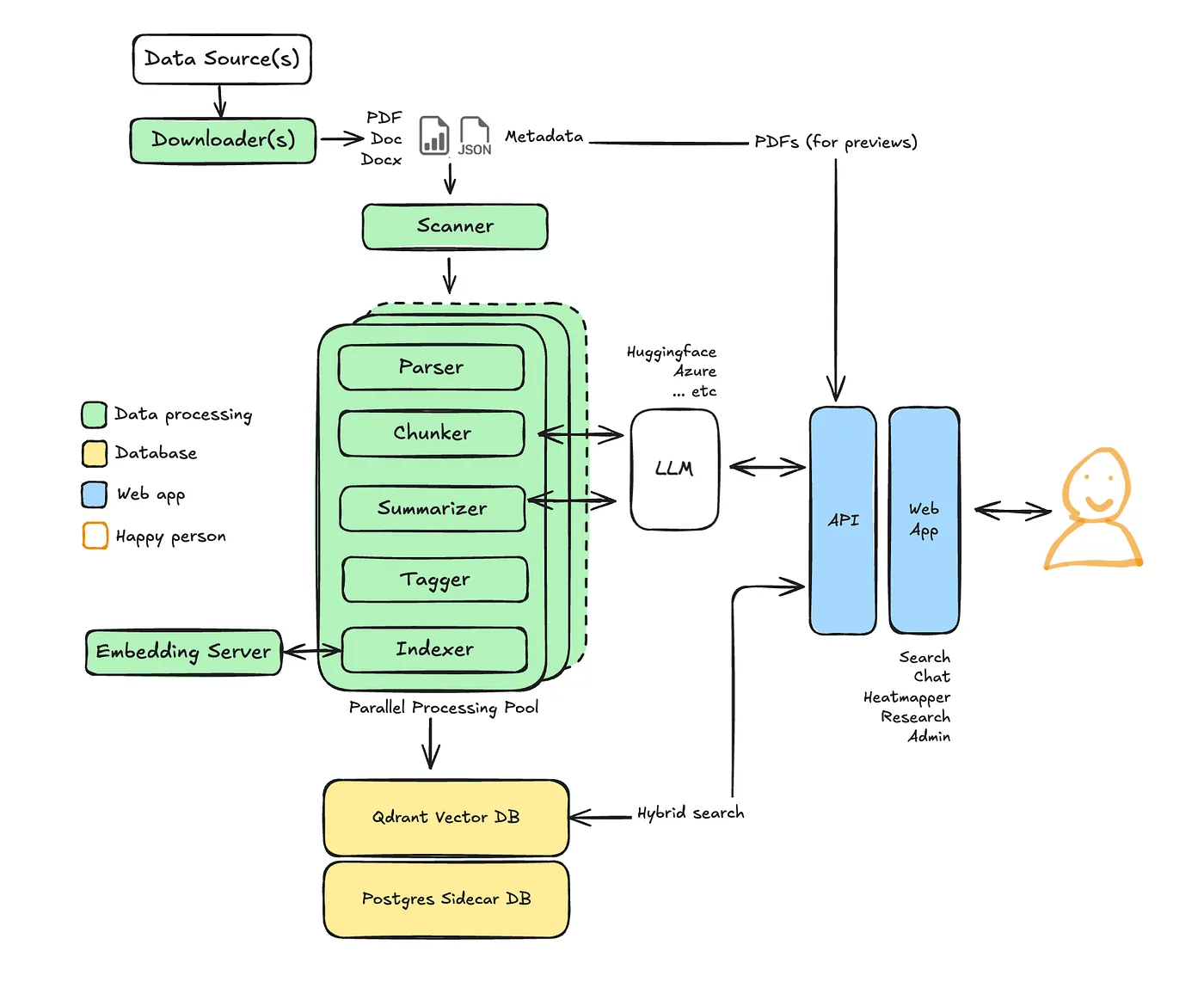
The pipeline takes documents through several stages, managed by a single orchestrator.py. Point it at a folder of PDFs, each with a companion metadata JSON file, edit a singleconfig.json and the orchestrator handles everything else.
Parsing
The parser uses Docling for document understanding, extracting the hierarchical structure of each document, like headers, sections, and paragraphs, rather than just flat text. It identifies images, tables, and figures and saves them as distinct assets. There’s a fair bit of post-processing involved: inferring heading hierarchy using font size and numbering heuristics, falling back to PyMuPDF bookmarks when Docling’s table of contents looks incomplete, identifying footnote superscripts through geometric analysis, and cleaning up the encoding artifacts that inevitably appear in PDF extraction.
This process still results in some parsing issues and could be improved by using powerful LLMs. However, the aim of Evidence Lab is to process reasonable volumes of documents (~20,000) at low cost, so there’s the balance I mentioned above.
Chunking
The chunker transforms raw, parsed text into searchable excerpts, respecting semantic boundaries rather than simply splitting by token count. When a chunk contains a citation marker, like[12], the chunker scans the entire document for the corresponding footnote text and appends it to that chunk. This means that a section referencing “See Reference 12” also includes the full text of Reference 12, which improves search results quality.
The chunker also captures a bounding box for each text chunk, which is key for downstream text highlighting. People get very grumpy when they have to scan a page to figure out which bit of text an AI response relates to.
Summarization
Document summaries are generated using a MapReduce approach. The system first searches for sections with titles such as ‘Executive Summary’ or ‘Abstract’ within the document structure. If those aren’t available, it splits the document into chunks, clusters them by semantic similarity, finds representative chunks from each cluster’s centroid, and summarizes those. For more details about the summarization technique, please refer to a previous blog post.
Tagging
Knowing the type of section text is useful, for example, in helping users filter out certain sections of documents. The tagger classifies every chunk into a taxonomy — findings, methodology, executive_summary, and so on — using a hybrid approach that combines deterministic keyword rules with LLM-based classification for ambiguous cases.
The system also supports configurable document-level taxonomies defined in config.json. For example, classifying documents against the United Nations Sustainable Development Goals (SDGs). This is performed by analyzing the document summary with an LLM and storing the results as faceted tags in the search index.
Indexing
Vectors are stored in a Qdrant database with multiple vectors per chunk to support different retrieval strategies — dense semantic vectors (defaulting to multilingual-e5-large, with support for Azure Foundry models) and sparse BM25 keyword vectors for exact term matching. The system is designed to switch embedding backends via the user interface, supporting both open-source models from Hugging Face and proprietary models.
Alongside the vector database is a Postgres ‘sidecar’ database for storing technical information and the text associated with each chunk. This is to reduce Qdrant’s memory footprint so it can run in-memory for faster search retrieval on a host with modest resources.
The User Interface
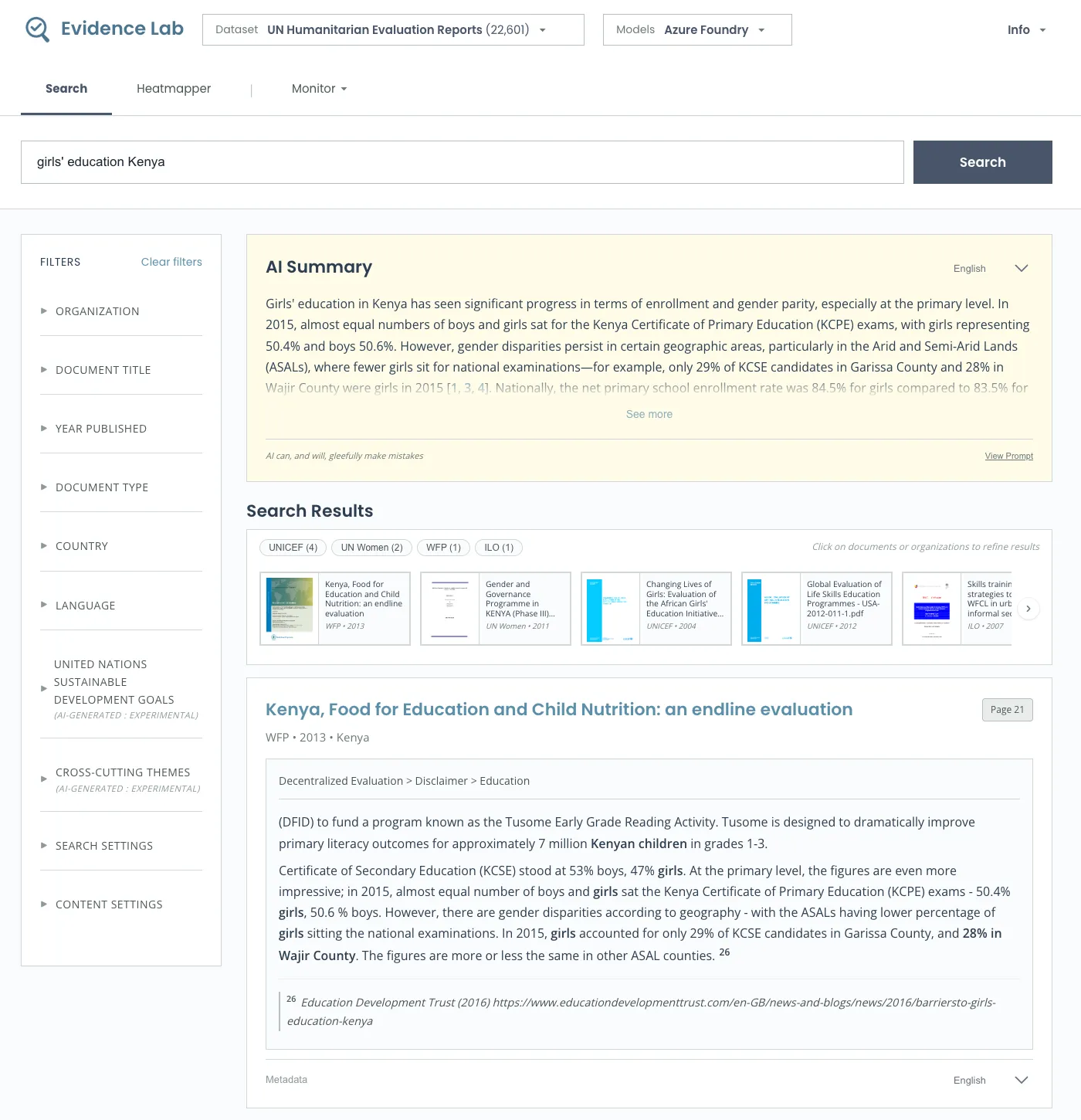
The user interface includes dropdown menus to select from the configured datasets and the suite of models to experiment with.
Search uses a hybrid approach, combining semantic and keyword search via Reciprocal Rank Fusion (RRF). Additionally, there’s optional reranking, with support for Cohere Rerank and Jina Reranker. The user interface provides control of various parameters, such as the blend between hybrid and keyword matching and field boosting for entities like country, which can be useful in some contexts.
Semantic Highlighting highlights relevant phrases in result snippets, which many users prefer to see in search results and AI-generated text. These are generated in the user interface at runtime by LLM as the user scrolls through results.
Document Preview is available on any search result and includes an in-document semantic search (rather than the typical PDF keyword search).
Translation of search results and AI summary is supported. To save costs, this is done on demand, with a drop-down on assets where the user can translate content.
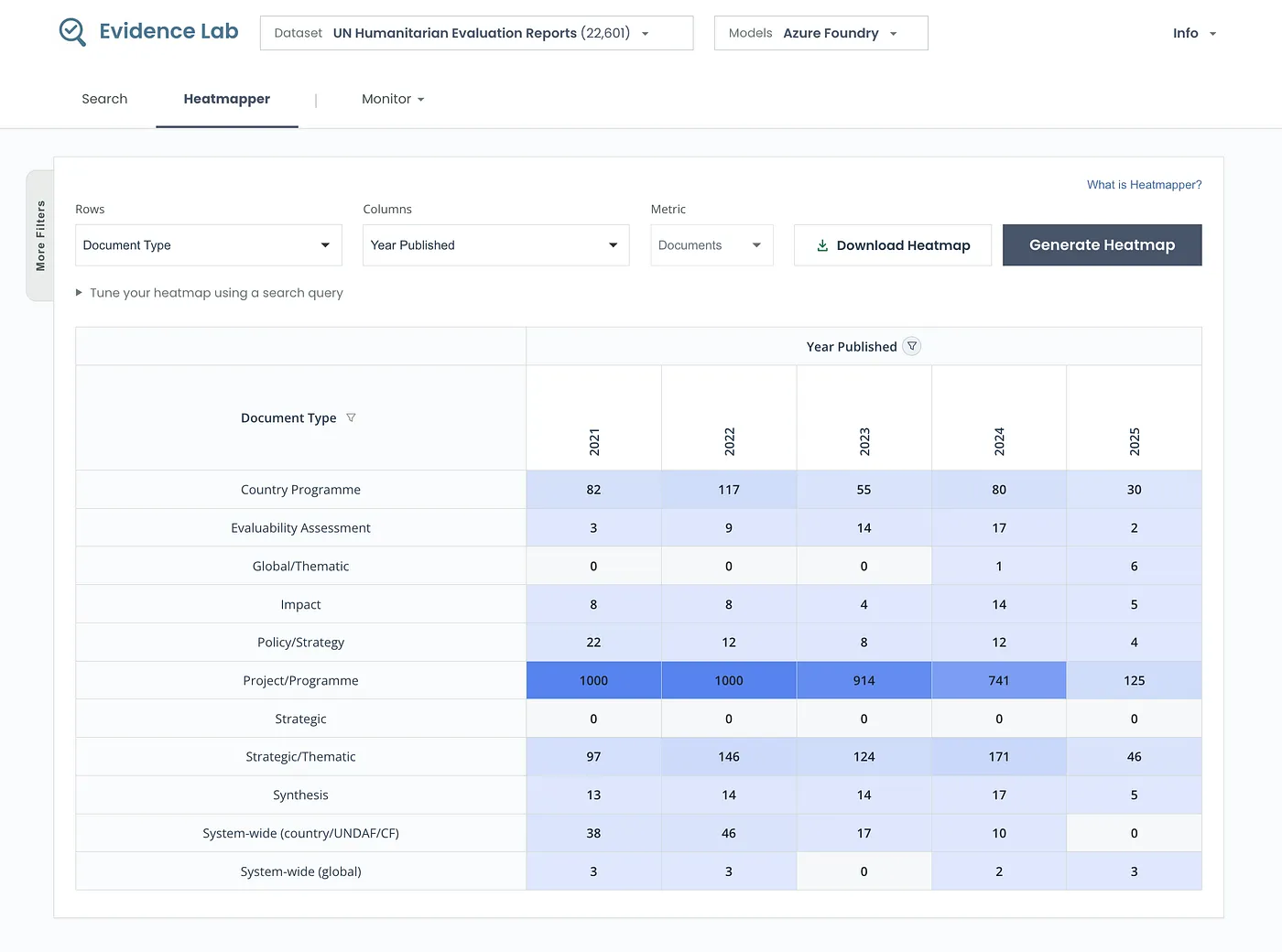
Heatmapper is an experimental feature for tracking trends across documents. It generates a grid showing search results for combinations of document attributes — for example, the number of documents by type published each year, or search hits by query across organizations. Another way to think of it is as a grid search, something that comes up a bit in document evidence mining. You can drill down into the underlying content and export to Excel for offline analysis.
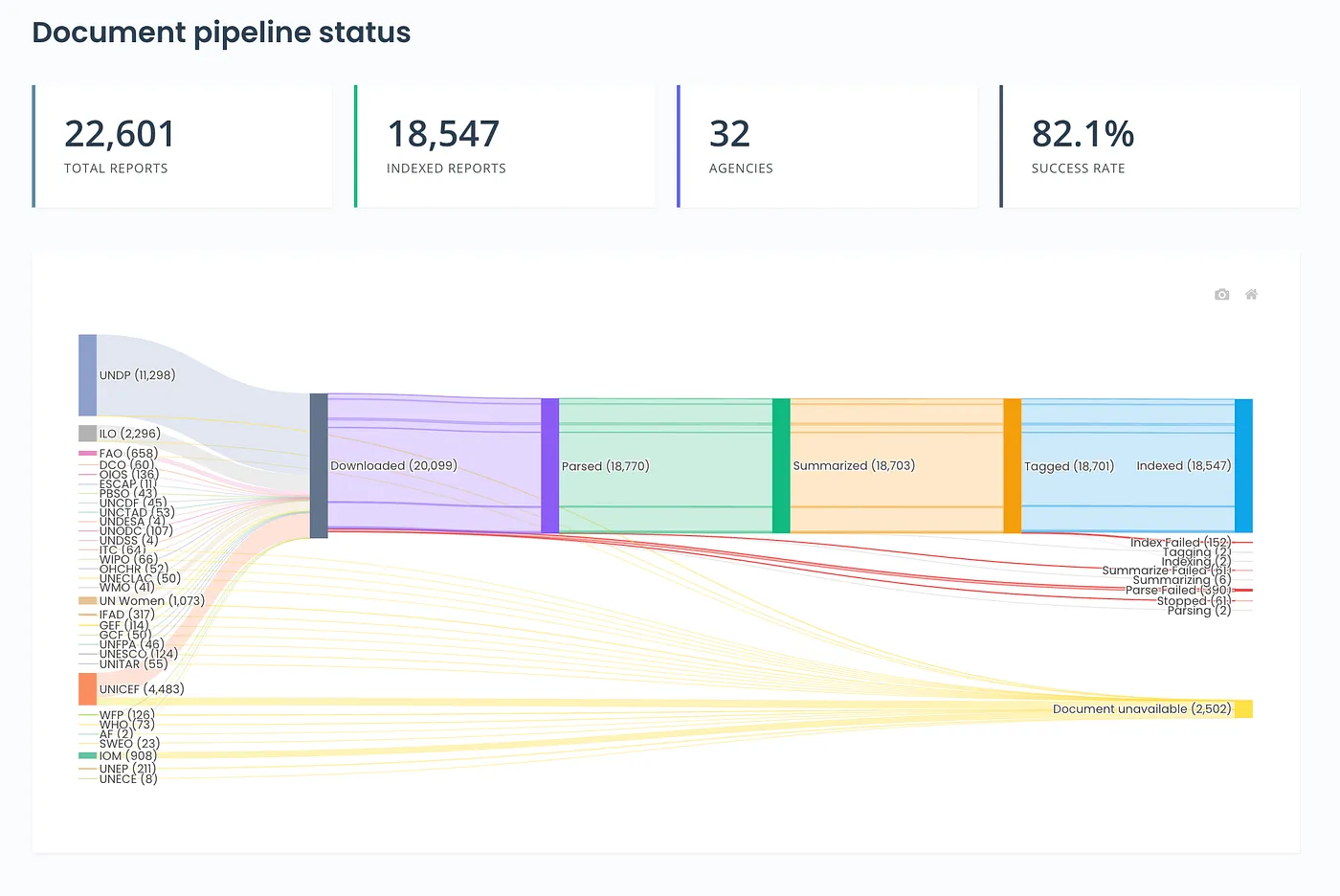
Pipeline provides an overview of the document-processing pipeline, which is useful when handling tens of thousands of documents.
The Demo: 18,500 UN Humanitarian Evaluation Reports
Online Evidence Lab has been populated with about 18,500 United Nations humanitarian evaluation reports from 30+ agencies sourced from the amazing United Nations Evaluation Group (UNEG). These documents cover everything from food security programs to disaster response to education initiatives worldwide.
Please note: Evidence Lab is not affiliated with or endorsed by the United Nations. The inclusion of these documents is solely for research, testing, and demonstration purposes.
More datasets will be added soon!
Getting Started
If you’d like to try Evidence Lab with your own documents, the quickest way is:
- Clone the repo and copy .env.example to .env
- Edit config.json to define your data sources, field mappings, and taxonomies
- Add your PDFs and metadata JSON files under data/<data_subdir>/pdfs/<organization>/<year>/
- Start the environment withdocker compose up -d –build
- Run the pipeline
docker compose exec pipeline \
  python -m pipeline.orchestrator --data-source your_source --skip-download
6. Open http://localhost:3000 and start exploring!
What’s Next
Evidence Lab will add new datasets and features in the coming year, starting with an MCP server to support integration with AI platforms, including ChatGPT and Claude.
Watch this space!
If you would like to have your public documents added to Evidence Lab for research or contribute to the project, please contact evidencelab@astrobagel.com.
You can find the open-source code here and access Evidence Lab online at evidencelab.ai.
Unless otherwise noted, all images are by the author.
Evidence Lab: A Free Open-Source Document Processing and Information Retrieval System to… was originally published in Data Science Collective on Medium, where people are continuing the conversation by highlighting and responding to this story.